# DMN docs (full text)
> DMN is a free desktop workspace for coding agents, with a local engine that keeps what they learn: code search that answers with the code itself, notes every agent on a project can read, lessons from past sessions, and advisory file claims.
Every page of https://getdmn.com/docs/, in reading order. Each page starts with a --- line and its address. The short index is https://getdmn.com/llms.txt.
---
https://getdmn.com/docs/
# Get started
> Get started with DMN: install it, open a project, connect Claude Code, Codex or Cursor, check the wiring and start your first agent, in five steps.
DMN is two things that work together: a workspace for the coding agents you already use, and an engine on your machine that indexes your code and remembers what your agents learn. Agents ask the engine instead of reading files one by one. DMN doesn't sell AI: your agents run unchanged, on your own plans.
*Diagram: How DMN fits: your agents ask the engine, the engine reads your project, and all of it runs on your machine.*
## Quickstart
### Install DMN
Get the Windows installer from the [download page](/download/). It installs for your user; no admin rights.
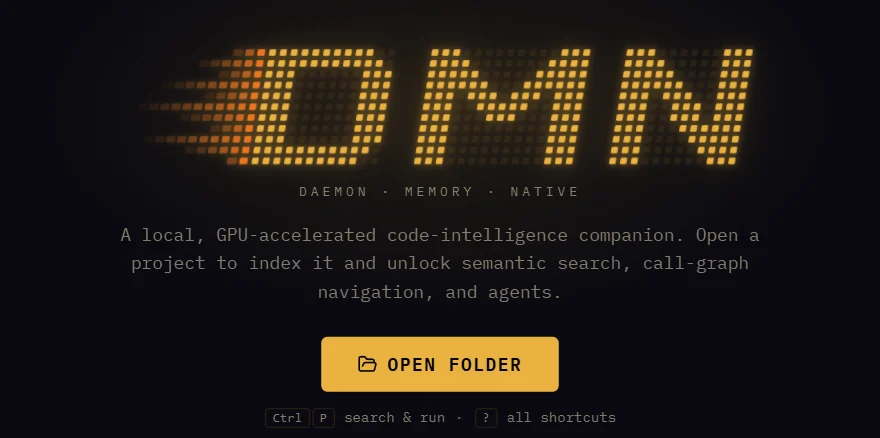
### Open a project
Open a folder in the app and DMN indexes it in the background, then keeps the index current as files change. From a terminal, `dmn index --watch` indexes the current folder and waits until it's searchable.
### Connect your agents
The app can do this for you: Settings ▸ Integrations. From a terminal:
```sh
dmn skill-init --apply # teach your agents the dmn command line
dmn mcp-init --apply # add DMN's MCP server to your agents
dmn hook-init --apply # brief Claude Code with the project's notes
```
The skill covers Claude Code, Codex, Gemini CLI, Cursor and OpenCode; MCP covers Claude Code, Codex, Cursor, Gemini CLI, Continue and Warp. Leave out `--apply` to see what a command would change first.
### Check the wiring
```sh
dmn config verify # skills, MCP entries and hooks; read-only
dmn doctor # the engine, models, index and wiring
```
### Start an agent
In the app, click **+ agent** in the Fleet panel, pick Claude Code or Codex, and give it a task. Once it's connected, it can ask DMN instead of grepping. Or try a search yourself:
```sh
dmn search "where does login redirect" --curate
```
## Where next
- [Connect your agents](/docs/connect/): every agent, and what each way of connecting gives it.
- [Code search](/docs/search/): what to ask, and how to read the answer.
- [Notes, lessons and claims](/docs/notes/): how agents share what they learn.
- [Install, update and remove](/docs/install/): checking the download, how updates work, and a clean uninstall.
- [Privacy and network](/docs/privacy/): what stays on your machine, and every connection DMN makes.
- [Commands](/docs/commands/): what your agents run, and what you can run yourself.
- [Keyboard shortcuts](/docs/shortcuts/): the keys that move you around the workspace.
- [The words](/docs/glossary/): agent, pane, fleet, project, claim and the rest.
- [Troubleshooting](/docs/troubleshooting/): what `dmn doctor` says, and what to do about it.
- [Questions](/docs/faq/): short answers on cost, privacy, agents, systems and the source.
## For AI agents
Every docs page has a plain markdown copy: add `.md` to its address, as in [/docs/commands.md](/docs/commands.md). [/llms.txt](/llms.txt) is a short index of the site, and [/llms-full.txt](/llms-full.txt) is every docs page in one file.
---
https://getdmn.com/docs/install/
# Install, update and remove
> How to install DMN on Windows, what the installer does, how to check the download, how updates work, and how to remove DMN and everything it set up.
## What you need
| | |
|---|---|
| System | Windows 10 or 11, 64-bit |
| GPU | Optional. DMN uses an NVIDIA card when it has the CUDA runtime, and the CPU otherwise |
| WebView2 | Comes with Windows 11. If it's missing, the installer fetches it from Microsoft |
| Agents | Your own Claude Code, Codex or other coding agent, on your own plan |
| Account | None |
| Network | Once, on first start, DMN downloads its search models: about 280 MB, or about 800 MB when it uses an NVIDIA GPU. `[models] downloads = false` in `config.toml` turns that off. [Privacy and network](/docs/privacy/) lists every connection |
## Install
### Download the installer
Get it from the [download page](/download/). The page shows the version, the size and the file's SHA-256.
### Check the file (optional)
In PowerShell, in your Downloads folder:
```powershell
Get-FileHash .\DMN_*_x64-setup.exe -Algorithm SHA256
```
The hash should match the one on the download page. The installer is also signed: right-click it, then Properties ▸ Digital Signatures.
### Run it
It installs into your user folder (`%LOCALAPPDATA%\DMN`) and adds that folder to your user PATH so agents can run `dmn`. Windows may show a SmartScreen warning the first few times a new release is downloaded; More info ▸ Run anyway lets it through.
Open a new terminal after installing, so it picks up the new PATH. Then follow [Get started](/docs/#quickstart).
## Updates
The app checks getdmn.com for a newer version a minute after it starts and every six hours after that. When there is one, it says so; nothing installs until you choose to. Each update is signed, and the app refuses one whose signature doesn't match.
While an update installs, the agents and shells in your terminals keep running and DMN restarts on its own. That needs **Keep terminals running** (Settings ▸ Terminals & browser), which is on unless you turned it off. Without it, the app won't install an update while terminals are open, and says how to turn it on.
## Remove DMN
Windows Settings ▸ Apps ▸ Installed apps ▸ DMN ▸ Uninstall. The uninstaller:
- stops DMN, its engine and its terminals, after asking;
- removes the DMN skill, DMN's MCP server and its hooks from your agents' user-wide settings;
- takes DMN's folder off your PATH and deletes the program and any CUDA runtime it downloaded;
- deletes the index, settings and logs too, if you tick **Delete the application data**.
It leaves alone what lives in your projects. For a clean slate, run these in each project before you uninstall:
```sh
dmn mcp-init --remove --apply # the MCP entry in the project's own config, such as .mcp.json
dmn skill-init --project --remove --apply # the skill, if you installed it per project
dmn hook-init --remove --apply # DMN's hooks in the project's .claude/settings.json
```
After uninstalling, each project still has its `.dmn` folder with the notes your agents wrote. Delete it if you don't want them. [Files and folders](/docs/files/) lists everything DMN writes.
---
https://getdmn.com/docs/connect/
# Connect your agents
> How to give Claude Code, Codex, Cursor, Gemini CLI, Antigravity CLI, OpenCode, Continue, Warp or any MCP client DMN's code search and notes, with the skill, MCP or hooks.
## Three ways in
| Way | What it gives the agent | Best for |
|---|---|---|
| The skill (`dmn skill-init`) | Teaches the agent the `dmn` command line, which it runs in its own shell | Agents with a shell: Claude Code, Codex, Gemini CLI, Antigravity CLI, Cursor, OpenCode. The lightest way: no tool definitions ride along in every request |
| MCP (`dmn mcp-init`) | DMN's tools: search, read, memory, claims and the rest | Agents without a shell, or that prefer tools |
| Hooks (`dmn hook-init`) | A briefing at the start of each session. In Claude Code also: a re-index of each file it edits, the fix when a failed command matches a lesson, and a stop before [a Bash command too long for Windows to run](/fixes/bash-unexpected-eof-windows/) | Claude Code and Codex |
You can use all three together. Each command shows what it would change; add `--apply` to write it, `--check` to verify it later, and `--remove --apply` to undo it. [Files and folders](/docs/files/#in-your-agents-settings) lists exactly what each writes.
## Agents in the DMN app
Start an agent with **+ agent** in the Fleet panel and it's connected before its first turn: DMN adds its MCP server to the agent's project config, and the agent gets the project's briefing as it starts. Run `dmn skill-init --apply` once as well, so agents can use the lighter command line.
Settings ▸ Integrations does the same for the agents it finds on your machine: a Connect button for each, or Connect all.
## Claude Code
```sh
dmn skill-init --apply --agent claude # the dmn skill, and the short-answers rule
dmn hook-init --apply # the briefing, re-index, lesson and long-command hooks, for this project
dmn hook-init --apply --global # or the same for every project
```
Restart Claude Code afterwards. `dmn mcp-init --apply --agent claude` adds the MCP server as well, if you want the tools too.
Short answers are on by default for Claude Code: the briefing asks it to answer tersely, which [in our benchmark](/benchmarks/#levers) cut tokens by a further 23% with answers rated about as useful. To turn them off, put this in `%APPDATA%\dmn\config.toml`:
```toml
[skill]
compact = "off"
```
## Codex
```sh
dmn skill-init --apply --agent codex # ~/.codex/skills/dmn
dmn hook-init --apply --agent codex # the briefing, in ~/.codex/hooks.json
dmn mcp-init --apply --agent codex # optional: the MCP server, in ~/.codex/config.toml
```
## Cursor
```sh
dmn skill-init --apply --project --agent cursor # .agents/skills in this project
dmn mcp-init --apply --agent cursor # .cursor/mcp.json
```
Cursor also reads the skill Claude Code and Codex use from your user folder. `dmn mcp-init --deeplink` prints a link that adds the MCP server to Cursor in one click.
## Gemini CLI, Antigravity CLI, OpenCode, Continue and Warp
| Agent | Command |
|---|---|
| Gemini CLI | `dmn skill-init --apply --agent gemini` and `dmn mcp-init --apply --agent gemini`. Gemini CLI itself now needs a paid API key or a Code Assist license: see [DMN for Gemini CLI](/agents/gemini-cli/) |
| Antigravity CLI (`agy`) | `dmn skill-init --apply --agent antigravity` writes `~/.gemini/antigravity-cli/skills/dmn/`. `dmn mcp-init --apply --agent antigravity` writes `.agents/mcp_config.json` in the project, or `~/.gemini/config/mcp_config.json` with `--global`. Google moved Gemini CLI's personal accounts to it |
| OpenCode | Reads the Claude Code and Codex skills. For an OpenCode-only setup: `dmn skill-init --apply --agent opencode` |
| Continue | `dmn mcp-init --apply` writes `.continue/mcpServers/dmn.yaml` |
| Warp | `dmn mcp-init --apply` writes `.warp/.mcp.json` |
## Any other MCP client
DMN's MCP server is the `dmn-mcp-bridge` program, which speaks MCP over standard input and output and finds the project from the folder it starts in. Most clients take a block like this:
```json
{
"mcpServers": {
"dmn": { "command": "dmn-mcp-bridge", "args": [] }
}
}
```
`dmn mcp-init --print` prints the exact block for each client it knows. [MCP tools](/docs/mcp-tools/) lists the tools the server offers.
## Check it worked
```sh
dmn config verify # every skill, MCP entry and hook, and whether each is current
```
Then ask the agent something about your code. A connected agent runs `dmn search` (or the `search` tool) instead of grepping.
---
https://getdmn.com/docs/workspace/
# The workspace
> How the DMN app works: panes and workspaces, starting agents, the Fleet panel and dock, approvals, the editor, the browser, automations, agents working with agents, and agent autonomy.
## Panes and workspaces
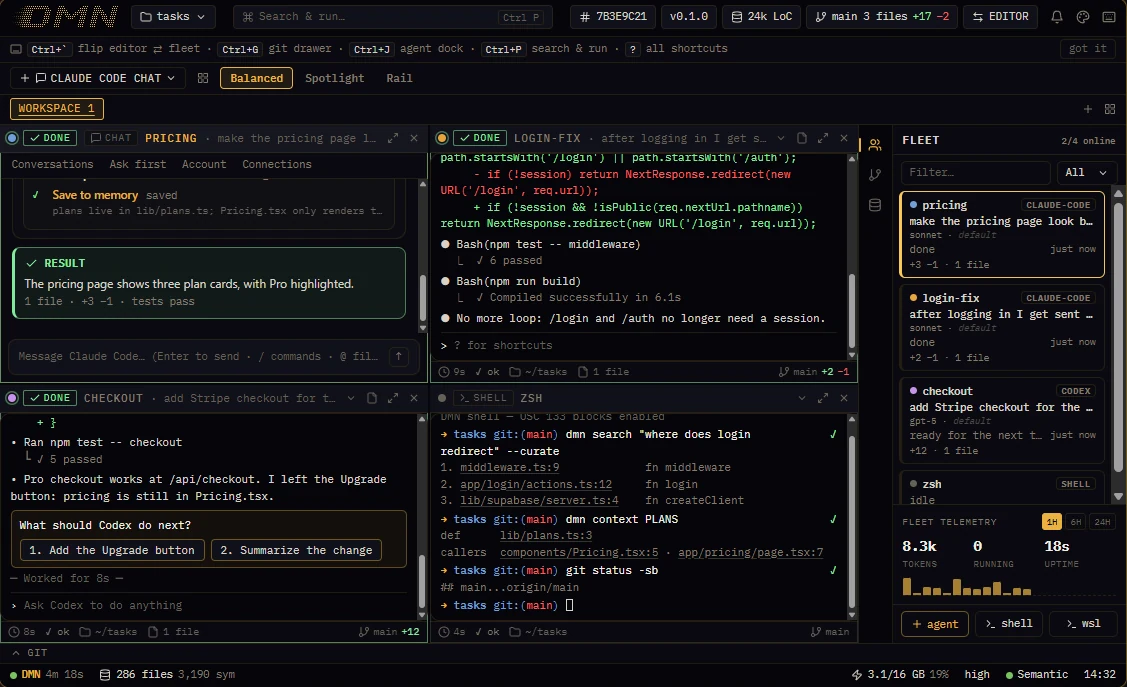
Each agent runs in its own pane. Claude Code, Codex, Gemini CLI, Cursor's CLI and Aider run in real terminals, exactly as they do anywhere else; Claude Code can also run in DMN's chat pane, which shows each turn as your prompt, the agent's activity and its result. Plain shells and code panes sit beside them.
- **Layouts:** Balanced tiles every pane, Spotlight gives the focused one two thirds, Rail three quarters. Ctrl+Shift+M focuses one pane full size.
- **Workspaces** are tabs, each with its own set of panes. Ctrl+Shift+O opens a new window.
- When an agent finishes a turn, a toast says so, so you can look away.
## Start an agent
**+ agent** in the Fleet panel opens the spawn sheet:
- **Which agent:** any CLI DMN finds on your machine. The sheet shows when a newer version is out.
- **Terminal or chat**, for Claude Code.
- **Where:** the project root, a folder, or a git worktree of its own, so parallel agents don't edit the same checkout.
- **Permission profile:** Standard (the default) keeps the agent's own permission prompts, and DMN refuses a short list of dangerous commands sent to the pane. Autonomous starts the agent with its prompts off; use it with care.
- **Account:** which Claude sign-in the pane uses, if you've saved more than one.
The agent starts connected to DMN: its MCP server and the project's briefing are there from the first turn.
## The Fleet panel and the dock
Every pane has a card in the Fleet panel: its status, what it's doing now, the model it runs, and the lines it has added and removed; a pane an agent opened names that agent. Click a card to jump to its pane. When an agent asks to edit a file or run a command through DMN, or asks for something [agent autonomy](#agent-autonomy) leaves to you, the request waits on its card for **Approve once** or **Reject**.
The rail beside the Fleet panel (Ctrl+J) switches to:
| View | What it shows |
|---|---|
| Changes | Files changed, grouped by the agent that changed them |
| Board | To-dos agents post and take, and steps only you can do; Ctrl+Shift+N goes to the next thing that waits for you |
| Memory | The notes agents have saved for each other |
| Accounts | Your Claude accounts and Codex, with each one's usage limits; click an account to make it the one new panes use |
| Browser | The pages agents have opened in DMN's browser |
| Automations | Scheduled runs: what agents set up, what waits for you to arm, and what ran |
## From terminal output to the code
A `path:line` in any terminal's output is a link: click it and the file opens at that line. A follow pane tracks the file an agent edited last, and when you open a file an agent has just edited, the editor says which agent it was. Ctrl+` flips between the fleet and the editor, and Ctrl+G opens the git drawer.
Each command in a terminal is marked with its exit status, so a failed one stands out.
## The omnibox
Ctrl+P opens one box for everything: commands, files, code search, panes, and handing a task to an agent. [Keyboard shortcuts](/docs/shortcuts/) lists the rest.
## Automations
An automation runs an agent prompt or a command on a schedule, once, or while you're away. Agents add one with `dmn automation add`, and it goes live at once; under the Manual preset of [agent autonomy](#agent-autonomy), it waits for you to arm it in the Automations view. An agent run happens in a worktree of its own. Every automation runs under caps: at most 24 runs a day, 30 minutes a run unless it sets up to four hours, two runs at once across all automations, and a pause after three failures in a row. Results that need you land in the view's inbox.
An agent can also watch something and be woken in its pane when it changes: a command it starts, when that command ends, or a pull request, each time its checks, reviews or comments change (this one needs the GitHub CLI, `gh`, signed in).
## Agents working with agents
An agent in a pane can open more panes beside its own, fork itself, send another pane a turn, read what a pane shows, interrupt it and close it. It does this with `dmn pane` ([Commands](/docs/commands/#from-an-agents-pane) lists them), and can hand a task to a headless teammate with `dmn agent spawn`. The panes it opens are ordinary panes: you can watch any of them and take one over by typing in it.
- A turn sent to a pane waits until that pane is idle, and starts with a line naming the agent that sent it. For a pane you're driving yourself, its header menu has **Don't take turns from other agents**.
- A fork starts with the agent's whole conversation and works on the same files, so it can try another way while the original carries on. With `--worktree` it gets a git worktree and branch of its own, starting with the agent's uncommitted work. It works for Claude Code and Codex panes.
- When an agent hits its usage limit, turns sent to it wait, and at the reset DMN sends it one turn to carry on.
## Agent autonomy
Settings ▸ Agents & chat ▸ Agent autonomy decides what agents do beyond their own pane without asking you.
| Preset | What agents do without asking |
|---|---|
| Autonomous (the default) | All of the above: open, fork, message, interrupt and close panes, start teammates, and arm and run their own automations |
| Guarded | Open, fork and message panes, never with looser permissions than their own, and arm and run their own automations. Closing a pane they didn't open, and starting a teammate, ask you first |
| Manual | Nothing beyond their own pane |
An agent's own pane, and the panes it opened, are always its own. **Details** sets each action separately and holds the limits that apply under every preset: how many agents agents may have running at once (eight by default), how deep agents may start agents, and a daily budget for the automations agents arm.
## Settings worth knowing
Settings opens with Ctrl+, and has a search box.
| Setting | What it does |
|---|---|
| Connect your AI tools | Connects the agents on your machine to DMN, one button each |
| Agents & chat ▸ Agent autonomy | What agents may do beyond their own pane without asking you |
| Terminals ▸ Keep terminals running | Agents and shells keep running when DMN closes or updates |
| Context tiering | Turns the proxy off or on for Claude Code panes |
| WSL jail | Runs agents' DMN commands in Linux over a copy of the project |
| GPU acceleration | Installs NVIDIA's CUDA runtime so indexing uses your GPU |
| Keyboard shortcuts | Changes any shortcut |
| Appearance | Six themes, from Phosphor to Paper |
---
https://getdmn.com/docs/search/
# Code search
> How agents ask DMN about code: plain-language search that returns whole sections, definitions and callers, blast radius, exact-text grep, other projects and a current index.
## What happens when an agent asks
*Diagram: One question, read three ways: DMN merges what each finds into one ranked list and sends back whole sections of code, fitted to a budget.*
DMN reads your code three ways when it indexes it: what each piece of code does, the exact words in it, and its structure, meaning which function calls which. A question goes to the ways that fit it, and DMN merges what they find into one ranked list. With `--curate` the answer is the code itself: whole functions, classes or blocks, cut to fit a budget, so the agent doesn't have to open file after file. A grep for words the code never uses finds nothing; a search by meaning still finds it.
## Ask in plain words
```sh
dmn search "where do we rate-limit logins" --curate
dmn search "how is a session resumed" "what happens when the token expires" --curate
```
- Several questions in one call each get their own results, and a section that answers two of them shows once.
- `--budget ` sets how much code comes back (8,000 characters by default).
- `--path` keeps the answer to part of the project: a folder or file (`--path src/auth`) or a glob (`--path "src/**/*.ts"`).
- Without `--curate`, you get a ranked list of files, each with the first few lines of what matched; `--compact` cuts those to 5 lines.
## Ask about a symbol
| Command | What it answers |
|---|---|
| `dmn context ` | Its definition, who calls it and what a change could affect, in one call; `--path ` picks one of several with that name |
| `dmn search --mode symbol ` | Where it's defined, and where it's used |
| `dmn search --mode trace ` | Who calls it, and who calls those |
| `dmn impact --symbol ` | What could break if it changes; `--path ` does the same for a file |
## When you know the exact text
```sh
dmn grep "TooManyRequests" # exact matches, with the code around them
dmn grep "retryAfter" "Retry-After" -i # several patterns, case-insensitive
dmn grep "TODO" --path src/auth -l # one folder; -l lists the files only
```
`dmn grep` is as exact as grep, but returns each hit inside its function or block rather than as a bare line. Its budget is 8,000 characters too, and `--compact` cuts it to 3,000. It searches hidden folders such as `.github/` and the agents' notes in `.dmn/memories/` as well, but never `.git` or anything your `.gitignore` leaves out.
## Find your way around
| Command | What it shows |
|---|---|
| `dmn search --mode structure src/auth` | A map of a folder: its files and what's defined in each |
| `dmn search --mode files "src/**/*.test.ts"` | Files that match a pattern |
| `dmn repo` | Branch, status, recent commits, ahead and behind, and stashes |
| `dmn review --base main --head HEAD` | What changed between two refs, file by file; `--mode semantic_diff` lists the symbols |
## Other projects
`dmn projects` lists every project DMN tracks, each with a short name. Use it to ask about one project from inside another:
```sh
dmn search "how does billing retry" --project billing-api --curate
dmn context chargeCustomer --project-path billing-api
dmn grep "STRIPE_" --path @billing-api:src
```
## Keeping the index current
DMN indexes a project when you open it in the app or run `dmn index`, then re-indexes files as they change. In Claude Code, a hook re-indexes each file the agent edits straight away. If results seem stale:
```sh
dmn index --watch # queue an update and wait until it's searchable
dmn index --force # rebuild the project's index from scratch
```
Search never starts indexing on its own, and never starts the engine.
## For agents without a shell
Every command on this page has an MCP tool behind it: `search` (with the same modes), `read`, `impact` and `repo`. See [MCP tools](/docs/mcp-tools/).
---
https://getdmn.com/docs/notes/
# Notes, lessons and claims
> How agents share what they learn through DMN: notes in each project's .dmn folder, your rules, the briefing a session starts with, lessons from fixed errors, past sessions, and file claims.
## Notes
A note is a short markdown file in the project's `.dmn/memories` folder. Agents write them as they learn something worth keeping: why a test is flaky, which file owns a setting, a decision you made. Every agent on the project can read them, whichever vendor it comes from.
```markdown
---
name: stripe-webhook-raw-body
description: The Stripe webhook must read the raw body before any JSON parsing
---
Stripe signs the raw request body. The handler in app/api/stripe/route.ts reads
request.text() first; parsing JSON before verifying breaks the signature check.
```
Agents use `dmn memory` or the `memory` tool. You can read and edit the files like any others, or in the Memory view beside the Fleet panel.
Several agents can write the same folder at once, so DMN records in each note which agent wrote it, from which branch, and when. When an agent replaces a note another session wrote, the old text is kept in `.dmn/memories-archive/history/` and the agent is told whose it was. When it starts a note that another one may already cover, it's told which, so it can update that one instead.
| Command | What it does |
|---|---|
| `dmn memory list` | The project's notes |
| `dmn memory read ` | One note |
| `dmn memory write --content ""` | Write a note, replacing any note at that path |
| `dmn memory delete ` | Move one to `.dmn/memories-archive/` |
Notes sit alongside `CLAUDE.md`, `AGENTS.md` and Claude Code's auto memory rather than replacing them. [Claude Code's memory between sessions](/guides/claude-code-memory-between-sessions/) compares them.
## Your rules
A rule is a note in the `rules/` folder, or one you mark with `kind: rule` in its front matter. Rules come first in every briefing, before any agent's notes, so use them for what every agent must know: how you want tests run, what never to touch.
Claude Code also saves your guidance in its own memory. The briefing lists the pieces no rule here says yet, marked as coming from Claude Code's memory, so agents from other vendors see them too.
```markdown
---
name: no-force-push
description: Never force-push; open a new branch instead
kind: rule
---
```
## The briefing
*Diagram: What a new session is told, in order. All of it comes from your machine.*
A session starts with a briefing built from the project's files. Claude Code gets it from the hook `dmn hook-init` installs, at the start of each session and again after it compacts its context. Codex gets it from its own hook, and agents connected over MCP get it with DMN's server instructions. A note whose code has been deleted, or changed in a commit since the note was written, is flagged, so an old note isn't taken for a current one.
Progress notes belong in `status/`: the briefing shows them for two days under "In flight", apart from what agents learned. When other agents are working on the same repository, in any of its worktrees, the briefing names each one with its branch, its task and what it last finished.
While a session runs, Claude Code is told before each prompt what other agents wrote since its last one, a new rule in full. A rule you give one agent reaches the others on their next turn.
## Lessons
When agents in two or more sessions hit the same error and fix it the same way, DMN turns that into a lesson: the error, and a one-line fix. Lessons come from your Claude Code and Codex session logs, read on your machine with recognised secrets removed.
- The briefing lists them, so a new session knows them from the start.
- In Claude Code, when a command fails and matches a lesson, the hook hands the agent the fix straight away.
- `dmn gotchas list` shows them, and `dmn gotchas forget ` stops one for good. The command line calls lessons gotchas.
[Error fixes](/fixes/) writes up lessons DMN learned in our own sessions, with the cause and the fix for each.
## Past sessions
`dmn memory search ""` searches dated records of earlier sessions: what each was asked, what it ran and what it concluded. Use it when you remember that something was done, but not where.
## Claims
Before an agent edits, it can claim the files or folders it's about to change, with a reason and an expiry (30 minutes unless it asks for longer, up to eight hours). Other agents check claims before they edit, and see who holds a file and why.
Claims are advisory. They never block a write: they're there so parallel agents can see each other, not to lock anything. Agents use the `lease` tool for them, or `dmn lease` from a shell; you don't manage anything.
```sh
dmn lease claim src/billing --reason "moving retries into the client"
dmn lease check src/billing/client.ts # held by someone else?
dmn lease release # done: release all of yours
```
A claim belongs to the agent that made it. Agents in DMN's panes, Claude Code and Codex have an identity already; a shell without one can check and list claims, and `dmn` says what to set before it can hold one.
---
https://getdmn.com/docs/limits/
# Make your limits last
> How DMN cuts the tokens your agents spend so your plan's limits last longer: search that returns the code, the skill, short answers, the proxy, what we measured, your own savings.
## What saves tokens
| Part | What it does | On by default |
|---|---|---|
| Search that returns the code | One call returns the sections that answer a question, so the agent doesn't read file after file | Once an agent is connected |
| The skill instead of MCP | Agents use DMN through their shell; no tool definitions are sent with every request | When you run `dmn skill-init` |
| Short answers | The briefing asks Claude Code to answer tersely | Yes, for Claude Code |
| The proxy | Compresses context that requests keep repeating | Yes, for Claude Code agents started in the app |
## What we measured
*Diagram: Tokens to find the code behind a real bug, against Claude Code without DMN (1.00×). DMN's own code, 14 tasks run twice, ranges are 95% intervals. Details on the benchmarks page.*
On real bug reports in DMN's own code, Claude Code found the right code with fewer tokens with DMN than without it: 0.85× with the search skill alone, and 0.65× with short answers on as well, which is how DMN ships. No run gave a plain agent the short-answer rule without DMN, so part of that 0.65× may come from the rule alone. On a public code base the model couldn't place from memory, agents made 11% fewer requests, but the token saving was too small to measure. On a popular project the model often knew where to look without any tools, and DMN made no clear difference.
These runs measured finding the code, which is only part of a session: agents also write and test code, where DMN changes less. Session-wide, the saving is likely closer to 5–10%. The [benchmarks page](/benchmarks/) has the method, every result and where DMN doesn't help.
## See your own savings
```sh
dmn stats # this project, the last 7 days
dmn stats --days 30 # a longer window
dmn stats --all-projects # every project together
```
`dmn stats` compares the code DMN sent your agents with what reading the same files whole would have cost, per agent and per day. It counts bytes, so it needs no model or price. The app shows the same figures in Insights, with the billed token counts of the requests that went through the proxy.
`dmn bench` builds a search benchmark from your own code and writes a report you can rerun: the same index and seed give the same numbers.
## Turn a part off
- **Short answers:** add `[skill]` with `compact = "off"` to `%APPDATA%\dmn\config.toml`. A blinded check rated the short answers about as useful as full ones, though they sometimes leave out a secondary detail such as a suggested fix.
- **The proxy:** Settings ▸ Agents & chat ▸ Context tiering, then restart the app.
- **The skill:** `dmn skill-init --remove --apply`.
---
https://getdmn.com/docs/privacy/
# Privacy and network
> What DMN keeps on your machine, every connection it makes to the internet and when, what the proxy does with your agents' requests, and how to turn each one off.
## On your machine
These stay on your computer. DMN has no account and no server that receives them.
- Your code, and DMN's index of it.
- The notes, rules and lessons your agents share, in each project's `.dmn` folder.
- Records of past sessions, which DMN builds from your Claude Code and Codex session logs (`~/.claude/projects`, `~/.codex/sessions`) so agents can search what earlier sessions did and learn from errors already fixed. Secrets it recognises, such as API keys and tokens, are removed first.
- Claims, activity and the savings figures in Insights.
- Your terminals' scrollback, so the app can restore them.
The engine only accepts connections from your own machine. Your agents still talk to their own AI providers, exactly as they do without DMN.
## Every connection DMN makes
| When | To | What it sends | Turn it off |
|---|---|---|---|
| A minute after the app starts, then every six hours | getdmn.com | Your DMN version and platform, to ask for a newer one. The site counts these checks per version and country, and keeps no IP address | Not yet a setting; without a network connection the app just finds no update |
| Once, when the engine starts with no index yet | getdmn.com, which hands the download to downloads.getdmn.com | Nothing about you: it downloads DMN's search model. The site counts the download per model and country, and keeps no IP address | Add `downloads = false` under `[models]` in `%APPDATA%\dmn\config.toml`; DMN then indexes with the smaller model it ships with |
| When the engine starts and the model that ranks search results isn't on your machine yet | Hugging Face | Nothing about you: it downloads that model, and tries again at the next start if the download fails | The same `[models]` setting; search then works without that model |
| Every six hours, while the app runs | registry.npmjs.org | The names of the agent CLIs you use (Claude Code, Codex, Gemini CLI), to show when a newer version is out | Not yet a setting |
| When a Claude Code agent you started in DMN sends a request, with the proxy on | Anthropic, through the proxy | The agent's own request, with repeated context compressed (see below) | Settings ▸ Agents & chat ▸ Context tiering |
| Every two minutes while the Accounts view is open | Anthropic and OpenAI, through your own Claude Code and Codex | Each saved sign-in's usage limits: DMN starts the CLI to ask, as you could yourself | Close the view |
| Only when you press Send: on Send feedback (Settings ▸ About DMN), or when the app offers a crash report | getdmn.com | What you wrote, or the crash report, with the app's version and platform. Your email address and the system details only if you add them. You see all of it before it goes, and the site emails it to us without storing it | Don't press Send |
| Once a week, only if you turn on Share anonymous usage counts | getdmn.com | Eight counts with no ID: the app's version and platform, roughly when you installed it, on how many of the last seven days it was open, your graphics card's maker and memory range, which agent tools are installed, and which Claude models your agents used that week through the proxy, by name and version only | Off by default (Settings ▸ About DMN) |
| When you click to install the CUDA runtime, or run `dmn gpu install-cuda` | pypi.org and its file host, and downloads.getdmn.com | Nothing about you: it downloads NVIDIA's runtime files from PyPI, and ONNX Runtime's CUDA library from DMN's download host | Don't install it; DMN runs on DirectML or the CPU |
| When the engine starts after an update, only if you installed the CUDA runtime and the update needs a newer ONNX Runtime CUDA library | downloads.getdmn.com | Nothing about you: it downloads that library again, so the CUDA fast path keeps working | The same `[models]` setting; CUDA then stays off until you run `dmn gpu install-cuda` |
| When you run `dmn models fetch` | Hugging Face | Nothing about you: it downloads a model | Don't run it |
| When you click fetch, pull or push in the git drawer | Your repository's remote, through git | What git sends, with your own git credentials | Don't click them |
| Every two minutes, only while a project has a `main-moved` automation armed | That project's `origin` remote, through git | A fetch, with your own git credentials, to see whether main moved | Pause or remove the automation |
| Every one to five minutes while an agent watches a pull request (`dmn automation watch --pr`), for a day unless it asks for longer | GitHub, through your own `gh` | Reads of that pull request's checks, reviews, comments and state | Don't start one; each ends after the hours it was given |
| Every five minutes while the app is in view, for each agent pane on a branch of its own (a worktree off main) | GitHub, through your own `gh` | A read of that branch's pull request: its state, checks and review, for the PR chip on the agent's row | Keep agents on main, or sign `gh` out |
| When you or an agent opens a page in DMN's browser | That page's site | What any browser sends. Agents can open local dev servers freely; for other sites the app asks you first | Don't open it |
| Only if you add an API key in Settings ▸ Memory, when a reflection runs | The provider you set there | The project's recent activity log (one line per action agents took through DMN), to distil into notes | Leave the key empty, or keep Auto-reflect off (the default) |
| Only if you turn on Discord Rich Presence | Your Discord app | Your DMN activity, as you choose to show it | Off by default (Settings ▸ Integrations ▸ Discord) |
| During install, only if WebView2 is missing | Microsoft | The standard WebView2 download | Install WebView2 yourself first |
That's all of them. Search and indexing run on your machine. The engine's only downloads are its own models, listed above, and nothing about your code, your searches or your files goes to getdmn.com.
When the engine crashes, it writes a crash report to a folder on your machine, with your user name and home folder taken out. The next time the app starts, it offers to send the newest one, shown in full first. It sends nothing unless you press Send.
## The proxy
*Diagram: With the proxy on, a Claude Code agent started in DMN sends each request to the proxy on your machine, which compresses repeated context and forwards it to Anthropic.*
The proxy is a small program on your machine between Claude Code and Anthropic. It compresses the context requests keep repeating, some of it into images, so it costs fewer tokens and your plan's limits last longer. Everything else passes through unchanged. It's on by default for the Claude Code agents you start in the DMN app, and only for those: other programs, and Claude Code you start yourself, talk to Anthropic directly unless you point them at it with `dmn proxy enable`.
Because it sits in the middle, it sees the full requests and replies of the traffic sent through it. What it keeps, it keeps on your machine: token counts for the savings figures, fingerprints of requests, and copies of the tool output agents read, with recognised secrets removed, so later sessions can search what earlier ones saw. It never sends any of that anywhere.
To run your agents straight against Anthropic, turn it off in Settings ▸ Agents & chat ▸ Context tiering; it takes effect the next time the app starts.
## The website
The site getdmn.com has its own [privacy page](/privacy/): what the visit counter keeps, and the launch email list.
---
https://getdmn.com/docs/files/
# Files and folders
> Every file and folder DMN writes: the program, its data and settings, the .dmn folder in each project, and the entries it adds to your agents' configs, with how to remove each.
## For your user
| Folder | What's in it |
|---|---|
| `%LOCALAPPDATA%\DMN` | The program: the app, the engine, the `dmn` command line, the MCP bridge, the proxy, the terminal host, and the model search uses. The uninstaller removes it |
| `%LOCALAPPDATA%\dmn-data` | The engine's data: each project's index, the search models it downloads on first start, logs, lessons, the proxy's records, the in-app browser's profile, the worktrees automations run in, and the folders of Claude accounts you saved in Settings ▸ Accounts (each holds that account's Claude Code sign-in) |
| `%APPDATA%\dmn` | Settings: `config.toml` for the engine and `workspace.toml` for the app |
`dmn whoami` prints the exact paths on your machine, and `dmn config show` says which settings came from which file. The uninstaller deletes the last two folders when you tick **Delete the application data**.
## In each project
DMN keeps a `.dmn` folder at the root of each project it indexes:
```text
.dmn/
memories/ notes agents share: one markdown file per note
sessions/ records of past sessions, by month
scrollback/ your terminals' output, so the app can restore them
project_id the project's identity, so a moved folder keeps its index
.gitignore keeps scrollback/ and sessions/ out of git
README.md says what the folder is, for anyone who opens it
workspace.toml the app's settings for this project, if you changed any
```
Code search leaves DMN's own files here out of the index (`project_id`, `.gitignore`, `README.md` and the settings files). The notes in `memories/` are indexed, so a search can find them alongside the code, unless your `.gitignore` leaves out the whole folder.
**What to commit.** `.dmn/scrollback/` and `.dmn/sessions/` hold terminal output and what your sessions did, so DMN writes a `.dmn/.gitignore` that keeps them out of git. It only writes the file when it's missing: edit it as you like, and an emptied file stays empty. The first time, it also writes a short `.dmn/README.md`, so someone who finds the folder in your repository knows what it is; delete it and it stays deleted. `.dmn/memories/` is plain markdown; commit it if you want the notes in the repository, or ignore the whole folder:
```text
# .gitignore
.dmn/
```
## In your agents' settings
These are written only when you run the command, click Connect in Settings ▸ Integrations, or start an agent in the app. Each command shows what it would change before you add `--apply`, and copies a file it changes to `.dmn.bak.