# The workspace
> How the DMN app works: panes and workspaces, starting agents, the Fleet panel and dock, approvals, the editor, the browser, automations, agents working with agents, and agent autonomy.
Source: https://getdmn.com/docs/workspace/
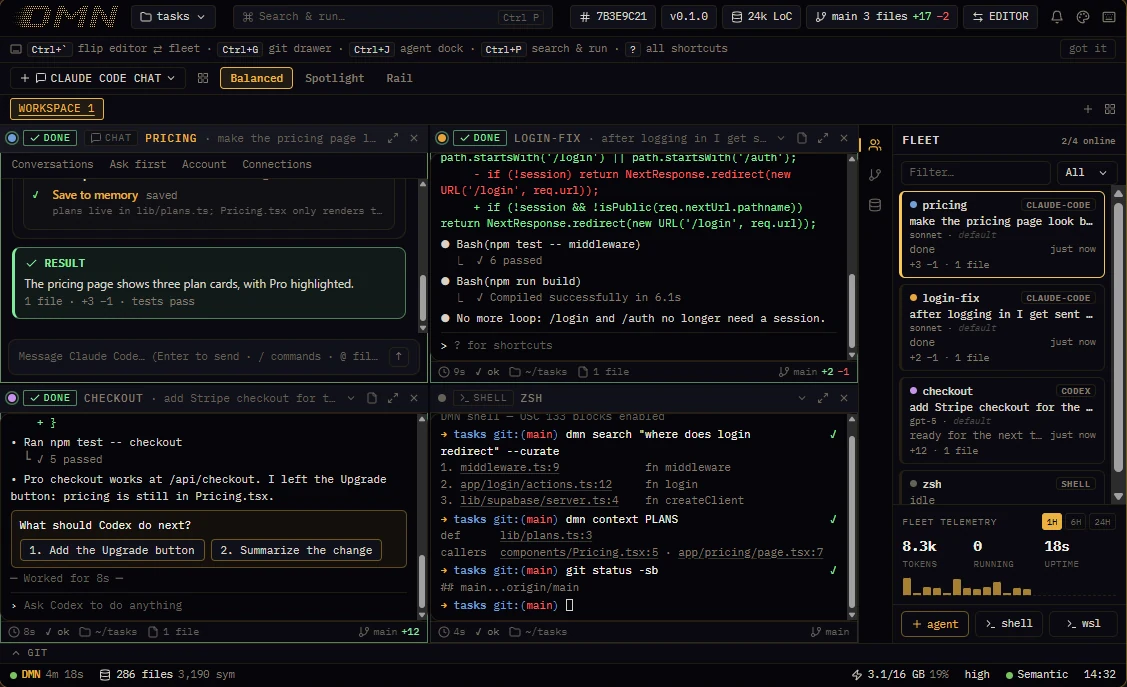
## Panes and workspaces
Each agent runs in its own pane. Claude Code, Codex, Gemini CLI, Cursor's CLI and Aider run in real terminals, exactly as they do anywhere else; Claude Code can also run in DMN's chat pane, which shows each turn as your prompt, the agent's activity and its result. Plain shells and code panes sit beside them.
- **Layouts:** Balanced tiles every pane, Spotlight gives the focused one two thirds, Rail three quarters. Ctrl+Shift+M focuses one pane full size.
- **Workspaces** are tabs, each with its own set of panes. Ctrl+Shift+O opens a new window.
- When an agent finishes a turn, a toast says so, so you can look away.
## Start an agent
**+ agent** in the Fleet panel opens the spawn sheet:
- **Which agent:** any CLI DMN finds on your machine. The sheet shows when a newer version is out.
- **Terminal or chat**, for Claude Code.
- **Where:** the project root, a folder, or a git worktree of its own, so parallel agents don't edit the same checkout.
- **Permission profile:** Standard (the default) keeps the agent's own permission prompts, and DMN refuses a short list of dangerous commands sent to the pane. Autonomous starts the agent with its prompts off; use it with care.
- **Account:** which Claude sign-in the pane uses, if you've saved more than one.
The agent starts connected to DMN: its MCP server and the project's briefing are there from the first turn.
## The Fleet panel and the dock
Every pane has a card in the Fleet panel: its status, what it's doing now, the model it runs, and the lines it has added and removed; a pane an agent opened names that agent. Click a card to jump to its pane. When an agent asks to edit a file or run a command through DMN, or asks for something [agent autonomy](#agent-autonomy) leaves to you, the request waits on its card for **Approve once** or **Reject**.
The rail beside the Fleet panel (Ctrl+J) switches to:
| View | What it shows |
|---|---|
| Changes | Files changed, grouped by the agent that changed them |
| Board | To-dos agents post and take, and steps only you can do; Ctrl+Shift+N goes to the next thing that waits for you |
| Memory | The notes agents have saved for each other |
| Accounts | Your Claude accounts and Codex, with each one's usage limits; click an account to make it the one new panes use |
| Browser | The pages agents have opened in DMN's browser |
| Automations | Scheduled runs: what agents set up, what waits for you to arm, and what ran |
## From terminal output to the code
A `path:line` in any terminal's output is a link: click it and the file opens at that line. A follow pane tracks the file an agent edited last, and when you open a file an agent has just edited, the editor says which agent it was. Ctrl+` flips between the fleet and the editor, and Ctrl+G opens the git drawer.
Each command in a terminal is marked with its exit status, so a failed one stands out.
## The omnibox
Ctrl+P opens one box for everything: commands, files, code search, panes, and handing a task to an agent. [Keyboard shortcuts](/docs/shortcuts/) lists the rest.
## Automations
An automation runs an agent prompt or a command on a schedule, once, or while you're away. Agents add one with `dmn automation add`, and it goes live at once; under the Manual preset of [agent autonomy](#agent-autonomy), it waits for you to arm it in the Automations view. An agent run happens in a worktree of its own. Every automation runs under caps: at most 24 runs a day, 30 minutes a run unless it sets up to four hours, two runs at once across all automations, and a pause after three failures in a row. Results that need you land in the view's inbox.
## Agents working with agents
An agent in a pane can open more panes beside its own, fork itself, send another pane a turn, read what a pane shows, interrupt it and close it. It does this with `dmn pane` ([Commands](/docs/commands/#from-an-agents-pane) lists them), and can hand a task to a headless teammate with `dmn agent spawn`. The panes it opens are ordinary panes: you can watch any of them and take one over by typing in it.
- A turn sent to a pane waits until that pane is idle, and starts with a line naming the agent that sent it. For a pane you're driving yourself, its header menu has **Don't take turns from other agents**.
- A fork starts with the agent's whole conversation and works on the same files, so it can try another way while the original carries on. With `--worktree` it gets a git worktree and branch of its own, starting with the agent's uncommitted work. It works for Claude Code panes.
- When an agent hits its usage limit, turns sent to it wait, and at the reset DMN sends it one turn to carry on.
## Agent autonomy
Settings ▸ Agents & chat ▸ Agent autonomy decides what agents do beyond their own pane without asking you.
| Preset | What agents do without asking |
|---|---|
| Autonomous (the default) | All of the above: open, fork, message, interrupt and close panes, start teammates, and arm and run their own automations |
| Guarded | Open, fork and message panes, never with looser permissions than their own, and arm and run their own automations. Closing a pane they didn't open, and starting a teammate, ask you first |
| Manual | Nothing beyond their own pane |
An agent's own pane, and the panes it opened, are always its own. **Details** sets each action separately and holds the limits that apply under every preset: how many agents agents may have running at once (eight by default), how deep agents may start agents, and a daily budget for the automations agents arm.
## Settings worth knowing
Settings opens with Ctrl+, and has a search box.
| Setting | What it does |
|---|---|
| Connect your AI tools | Connects the agents on your machine to DMN, one button each |
| Agents & chat ▸ Agent autonomy | What agents may do beyond their own pane without asking you |
| Terminals ▸ Keep terminals running | Agents and shells keep running when DMN closes or updates |
| Context tiering | Turns the proxy off or on for Claude Code panes |
| WSL jail | Runs agents' DMN commands in Linux over a copy of the project |
| GPU acceleration | Installs NVIDIA's CUDA runtime so indexing uses your GPU |
| Keyboard shortcuts | Changes any shortcut |
| Appearance | Six themes, from Phosphor to Paper |